
By Fredrik Brattstig @virtualbrat
2 September 2026
On September 1, 2026, Microsoft announced that Azure Virtual Desktop Hybrid is Generally Available!
This is a rather significant extension of the Azure Virtual Desktop platform. Instead of requiring the AVD session hosts to run in an Azure datacenter, or on Azure Local, organizations can now run Azure Virtual Desktop session hosts on their existing on-premises infrastructure while continuing to use the Azure Virtual Desktop service in Azure. (TECHCOMMUNITY.MICROSOFT.COM)
This is a big one!
The What?
With Azure Virtual Desktop Hybrid, the control plane remains in Microsoft Azure, but the actual Windows desktops and applications can run inside your own datacenter.
The on-premises Windows machines are connected to Azure using the Azure Arc Connected Machine agent. The Azure Virtual Desktop Arc extension then installs the required AVD components and registers the machine as a session host in an Azure Virtual Desktop host pool. From the user perspective, the resource is published and launched in the same way as any other AVD desktop or application. (Microsoft Learn)
Very simplified:
Microsoft manages the Azure Virtual Desktop service.
You manage the session hosts, hypervisor, network and storage.
The session host can be a Windows virtual machine running on your preferred on-premises hypervisor, or in supported scenarios, a dedicated headless physical Windows machine. It does not have to be hosted on Azure Local. (Microsoft Learn)
This opens a completely new way of looking at Azure Virtual Desktop. AVD is no longer only a cloud-hosted VDI platform. It can now also be used as the cloud-managed control plane for Windows desktops and applications running on existing datacenter infrastructure.
The Why?
There are many reasons why an organization may not want to move every Windows workload into an Azure region.
The applications may have dependencies on local databases, production systems, medical equipment, factory systems or large datasets. Moving the desktop to Azure while leaving all the application data on-premises can sometimes create more latency than it removes.
There may also be existing investments in virtualization infrastructure that still have several years of useful life remaining.
Azure Virtual Desktop Hybrid allows the Windows workload to remain close to those systems while the organization still benefits from the AVD workspace, brokering and management experience.
But there is one very important piece of technology that makes this architecture work properly from a networking perspective:
RDP Shortpath!
I have written about RDP Shortpath several times before, especially in the context of Azure Virtual Desktop on Azure Stack HCI, now called Azure Local.
The network principle is exactly the same with Azure Virtual Desktop Hybrid – but it is now relevant to a much broader range of on-premises infrastructure. (VirtualBrat)
Let me explain why:
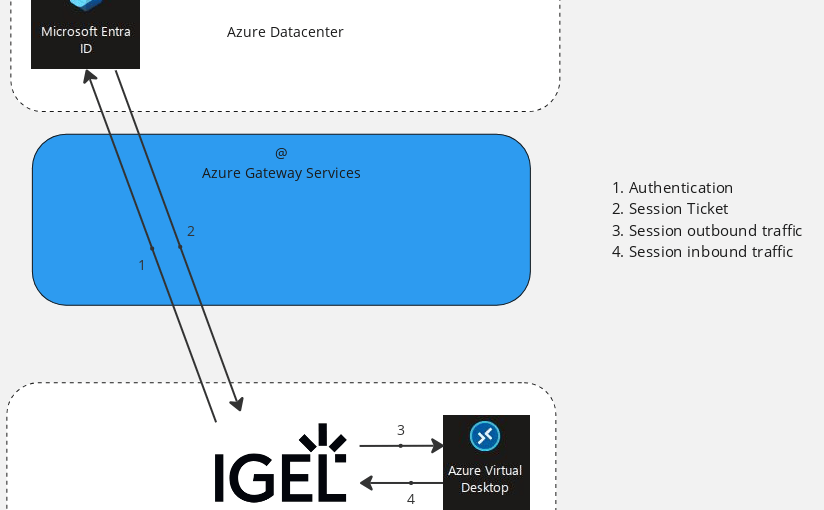
A regular Azure Virtual Desktop connection initially uses the Azure Virtual Desktop Gateway and a TCP-based reverse connect transport.
If the connection remains on this transport, both the endpoint and the session host connect to the Azure Virtual Desktop Gateway, which relays the RDP traffic between them. This works very well for compatibility and means that administrators do not need to expose a traditional inbound TCP 3389 connection to the session host. (Microsoft Learn)
However, imagine the following scenario:
The IGEL OS endpoint is located in the customer’s office.
The Azure Virtual Desktop Hybrid session host is located in the same office or datacenter.
Without RDP Shortpath, the session traffic can follow this route:
IGEL OS endpoint → Azure Virtual Desktop Gateway → on-premises AVD Hybrid session host
The endpoint and session host may be only a few network hops away from each other, but the RDP traffic is still relayed through the Azure Virtual Desktop Gateway.
It works – but it is not the most logical traffic path!
Adding RDP Shortpath
When RDP Shortpath is available, authentication and initial session brokering still take place through the Azure Virtual Desktop service.
After the connection has been authenticated and matched to the correct session, the client attempts to establish a direct UDP-based connection to the session host.
When successful, the remote graphics, keyboard and mouse input, device redirections and the other RDP virtual channels are moved from the reverse connect transport to the direct RDP Shortpath transport. The connection is secured using TLS over reliable UDP. (Microsoft Learn)
The traffic flow then looks more like this:
Azure Virtual Desktop: Authentication, resource feed and session brokering
IGEL OS endpoint → direct secure UDP connection → on-premises AVD Hybrid session host
Now the actual user-session traffic can remain on the local network, private WAN or VPN instead of making an unnecessary detour through the Azure Virtual Desktop Gateway.
That is precisely where RDP Shortpath becomes so important for Azure Virtual Desktop Hybrid!
Microsoft states that Shortpath can establish direct connectivity over managed networks where the client has line of sight to the session host. If direct UDP connectivity cannot be established, the session can fall back to the TCP-based reverse connect transport. (Microsoft Learn)
So, to be technically correct:
RDP Shortpath is not what makes the Hybrid session host appear in the AVD resource feed. It is what makes accessing that on-premises session host make network sense!
The IGEL angle!
The current IGEL for Windows app includes RDP Shortpath support, and the UDP Shortpath option is activated by default.
When the network provides direct connectivity between the IGEL OS endpoint and the AVD session host, the client can establish a direct UDP-based connection instead of keeping the user session on the reverse connect transport. (IGEL Knowledge Base)
This existing implementation is highly relevant to Azure Virtual Desktop Hybrid.
Because the Hybrid session host is registered in an Azure Virtual Desktop host pool and delivered through the regular AVD service, the endpoint still consumes an AVD resource. The important client-side difference is that RDP Shortpath allows the client to address the on-premises workload using the optimal direct data path.
From the user perspective, it is still the same IGEL for Windows app and the same resource picker.
The desktop itself could be running in an Azure region, on Azure Local, or now on the customer’s existing on-premises virtualization platform – Azure Hybrid!
The user does not need to understand where it is running – but the network most certainly should!
Important Information!
Azure Virtual Desktop Hybrid should not be mistaken for Azure Virtual Desktop for Azure Local without the Azure Local platform.
There are currently some important differences.
Windows 10 and Windows 11 Enterprise multi-session are not supported on Azure Virtual Desktop Hybrid. Microsoft also states that the service does not provision or manage the virtual machine state. This means that AVD power management, Autoscale, Start VM on Connect and Session Host Configuration are not currently supported. The organization remains responsible for deploying, starting, stopping, updating and maintaining the on-premises session hosts. (Microsoft Learn)
Licensing also consists of two parts: the required Windows or RDS user entitlement and an Azure Virtual Desktop Hybrid service user license. Microsoft currently directs customers to contact their Microsoft account team for Azure Virtual Desktop Hybrid purchasing options. (Microsoft Azure)
You should also verify that RDP Shortpath is actually being established. Just because the session host is on-premises does not automatically mean the client is using a direct connection. Firewalls, routing and the RDP Shortpath configuration on the session host and client still matter.
For managed networks, Microsoft uses UDP port 3390 by default for the traditional direct Shortpath listener, although newer NAT-traversal options can use dynamically negotiated UDP ports. (Microsoft Learn)
Final Thoughts!
Azure Virtual Desktop Hybrid changes the reach of Azure Virtual Desktop considerably.
Organizations can keep Windows desktops and applications close to their existing infrastructure and data while consuming the Azure Virtual Desktop control plane as a Microsoft-managed cloud service.
For customers with existing datacenter investments, local application dependencies or workloads that simply do not belong in a distant Azure region, this creates a very interesting additional option.
But the location of the session host is only half of the architecture.
To truly harvest the benefit of running the workload locally, the endpoint needs to establish the most direct possible session transport.
That is why RDP Shortpath is not just a performance checkbox for Azure Virtual Desktop Hybrid – it is one of the main technologies that makes the entire hybrid design come together!
That’s it for today!
Happy Hybrid Shortpath’ing!
/Fred

